Mobile automation is expensive to start
Real devices mean signing and environment setup, fragile locators and flaky runs. Months before the first payoff.
claude code · android + ios · real devices
Claude Code agents write and run automated tests on your real Android and iOS devices in parallel. Every change is checked before it is accepted, failures are analysed automatically, and found bugs go to your tracker.
// case
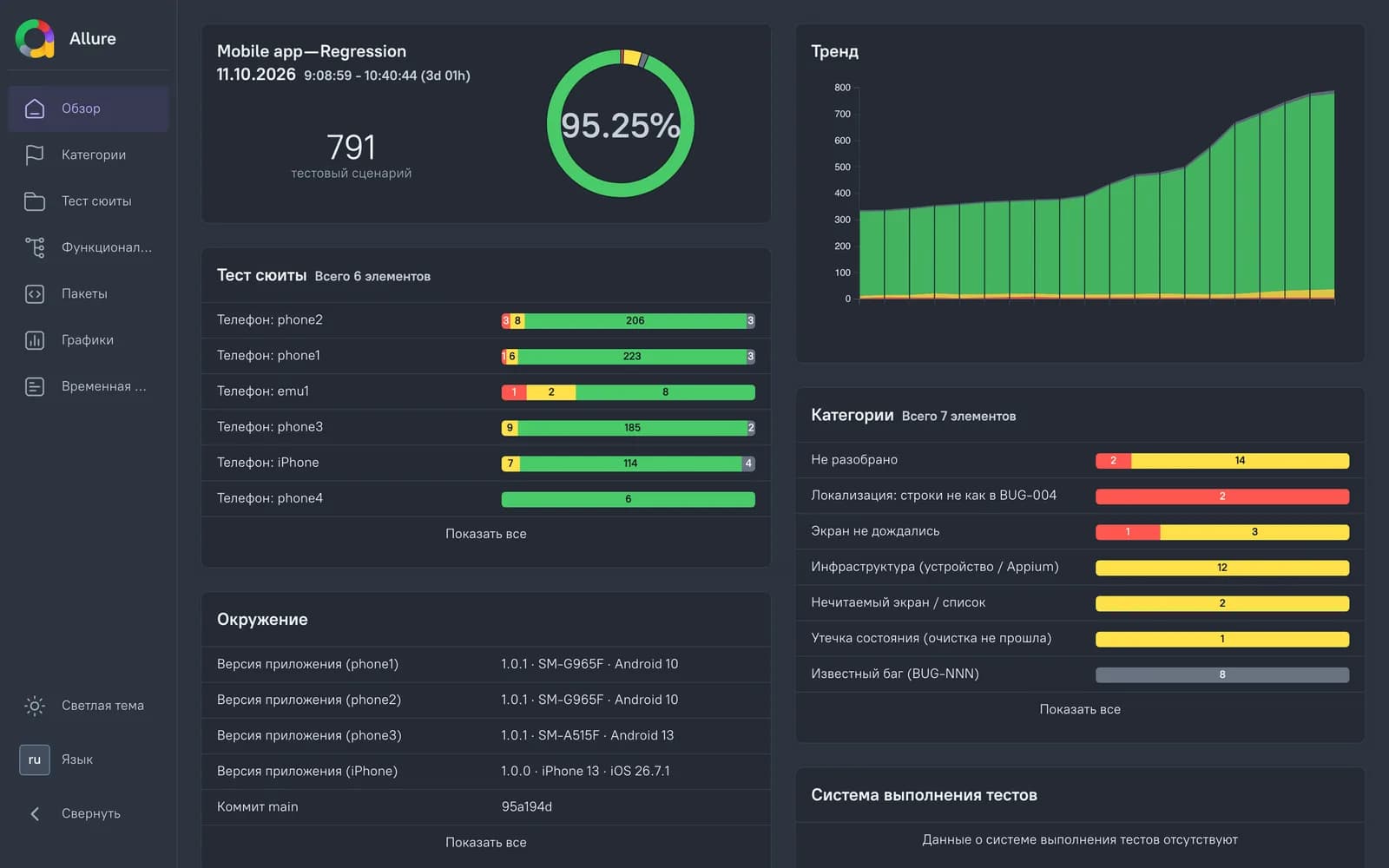
A mobile marketplace, Android + iOS. Anonymised at the client's request.
Numbers come from the repository history and run reports; the app and client are not named.
// what changed
AI learned to write code, and checking it became the bottleneck. Now AI can do that part too.
AI-written code
AI took over the routine of development: tasks and fixes get closed in hours, not days.
manual testing
Dozens, even hundreds of tasks closed by AI land on testers. Manual checking runs at the same old pace, so the queue only grows.
AI testing
AI works through the app's business logic, explores user scenarios and checks them on real devices. Testing gets automated the way development already did.
// problem
The idea of letting AI test is simple. On mobile, making it work runs into three things.
Real devices mean signing and environment setup, fragile locators and flaky runs. Months before the first payoff.
Automated tests written once fail with every screen change, and maintaining them eats the time automation was meant to save.
Ask an AI to "write tests" and you get false-green checks, a messed-up test account and tests that never ran on a phone.
// how it works
Agents on your devices write and run tests in parallel. Every change is checked before it is accepted, failures are analysed automatically, and found bugs are documented and sent to your tracker. You get the result: new tests, a report and a bug list.
testsWrite tests from your regression checklist and run them on real Android and iOS devices — in parallel on several phones.
controlNo change is accepted unchecked: false-green tests and side effects on the account do not reach your code.
analysisRed results do not sit unattended: for every failure it is clear whether it is an app bug or a test problem.
prioritiesWork never stalls: checklist coverage grows, found bugs get rechecked, and you see the progress.
// what's inside
The template is configured for your app and devices and then runs on your side.
write, run and check tests, analyse failures
Kotlin and JUnit 5, ready to grow with your app
in parallel on several real phones
results from all devices in one place, with history
documented reports with evidence: Jira or manual
guard rails for the test account and irreversible actions
tests are written from your regression checklist
how to configure, run and grow the conveyor
// safety
The conveyor runs on your devices and test accounts, so guard rails are built into the conveyor itself, not left to "we asked the agent to be careful".
You define what agents never do: delete the account, log out, make a real payment. Such checks stay manual.
Real operations (an order, for example) are allowed only on a dedicated test object, and their cancellation is confirmed.
Parallel runs on different phones do not conflict or break each other's sessions.
A change that could give a false-green result or mess up the account state does not reach your code.
Tests clean up after themselves, and the account state is checked after the conveyor's work.
The conveyor runs on your machines and devices; code, tests and data do not go to a third-party service.
// comparison
| SaaS platforms (QA Wolf, Maestro Cloud, etc.) | AI testing courses | This kit | |
|---|---|---|---|
| Where tests live | on the vendor's side | course examples | in your repository |
| Devices | the vendor's cloud devices and emulators | usually a browser | your real Android phones and iPhones |
| Platform | depends on the vendor | mostly web and Playwright | mobile: Android + iOS |
| Pricing model | subscription, often per test or device | one-time per course | one-time purchase + a year of updates |
| If you stop paying | access to runs ends | the knowledge stays | the code and the conveyor stay with you |
SaaS services are great when you want a ready device farm and a team on the vendor's side. The kit is for teams that want to keep tests and infrastructure in-house.
// pricing
The template is for teams ready to configure it themselves. Setup is for when you want a working conveyor on your devices.
A ready multi-agent conveyor repository with documentation.
I configure the conveyor for your app and devices and run the first tests together with you.
How to work with a multi-agent conveyor and run it yourselves.
The Claude subscription and devices are yours and not included.
// training
2 days online, small group, hands-on with your own devices. For QA engineers and mobile developers.
where AI agents help in mobile testing and where their limits are
what to prepare: devices, test accounts, a regression checklist
how to get stable tests on Android and iOS
how to tell a real check from a false-green one
from a failing test to a ready report in the tracker
how to give agents a test account without losing control
how to read results and show progress to the team
how to extend coverage and maintain the tests
// faq
Yes. Testing on an iPhone needs a Mac with Xcode. The kit targets macOS, so a Mac is needed for the conveyor as a whole.
You need a Claude plan with Claude Code access or an API key — paid by you directly to Anthropic. Parallel work on several devices uses a lot, so for 3–4 devices the higher tiers are more practical. Current prices are at claude.com/pricing.
Android phones and emulators with USB or Wi-Fi debugging, and iPhones with Developer Mode. You can start with a single phone and add devices later.
Kotlin, JUnit 5, Gradle; Android and iOS on real devices. This is the stack supported out of the box; another one can be discussed as part of a setup.
Out of the box: Jira or manual mode (bugs are prepared for filing and you file them). I can connect another tracker as part of the setup package.
You define the forbidden actions, irreversible operations are allowed only in a sandbox, and every change is checked before it is accepted. Use test accounts.
// request
Tell me about your app and devices — I reply on Telegram or by email within a day.
Telegram @kolyall ↗Tell me about your app and devices and what you need — template, setup or training.
Message on Telegram